Showing posts with label Lumipro. Show all posts

Saturday, July 8, 2017

SWANK July Round #1 - LUXE Paris Hooded T-Shirt

The Hooded T-shirt outfit from Luxe Paris is available in 3 variants. The Limelight option shown under here. Jeans are included with the outfit, and is available for Signature, SLink, TMP and Adam mesh bodies. Also in the box are four sizes of the shirt and jeans for the standard body. 


SWANK has over 100 designers showcasing their talent and products such as Women and Mens clothing, Home & Garden items, Animations and much much more. With a new round every month, you'll always be able to find just what you need.


Style Card: 


Outfit


Pose by Scott Nobody

Sunday, June 11, 2017

Casual elegance by .Be

SWANK June Round is well underway, and for the guys .be or Dot-BE fashion really knocked it out of the park with this amazing looking suit called Gentle - elegant but also casual. No jacket comes with the outfit but you dont need it. Comes in two amazing textures, see below. The glasses, cane and cap are included in the box. The high collar and unbuttened shirt really sends a statement that you can relax in style.
This suit should be in your wardrope right next to the tux of your choice.

There are two options for this outfit.
Top, the wide striped version.
Below, thin striped version.
Take your pick - or why not get them both.

The outfit is of course mesh. Ready for Slink and TMP but also included in the box is fitmesh and alpha for standard bodies.

Head on over to the SWANK June Round and pick the set up.


Style Card: 

Outfit

Shoes

Pose

  • Casual Elegance by Scott Nobody
Photo taken at Stuttgart


Tuesday, September 27, 2016

Balance


SWANK September Round is almost over, but there is still time to go get this outfit from ::ALTER:: This set is the Jason Jeans and T-shirt Hipster. Included is also a Flannel shirt wrapped around the waist. Jeans, T-shirt and Flannel shirt is HUD controlled giving endless combinations. The outfit is available in 5 standard mesh sizes.

The pose is the latest men's pose from the .:: Pose Talk ::. store. It was originally created as a crouch pose, but I think it works very well as an action pose too. The pose is available in-world and in the Marketplace.

.:: Pose Talk ::. - Balance - Action pose

.:: Pose Talk ::. - Balance - Crouch (static) pose
Style Card: 

Outfit
Hair
  • Dura ~ Boy*58 - Black

Shoes

Pose


Thursday, September 8, 2016

Hey You

Hot off the virtual sowing machine comes this outfit from JZ for Men, right now featured at the SWANK September Event. The Chinos pants and a the Multi Stripe pullover sweater makes this a perfect combo for a casual look. The sweater has a nice knitted texture with a cool V-shaped neck, perfect for displaying your favorite necklace. Both pants and sweater comes in 5 standard mesh sizes.


Style Card:

Outfit
Hair
  • Dura ~ Boy*71 - Black
Head

Body

Skin

Shoes

Accessories

  • ::GB:: ~ Angel Wings Necklace
  • {JAS} James - Silver Rings

Pose


Picture taken @ Hazardous

Sunday, March 27, 2016

Run, Baby, Run

Sheryl Crow is one of my all time favorite singers. Amazing, timeless lyrics and music that never gets old to listen to. While editing this image I was listening to one of her old albums (Tuesday Night Music Club) and her song Run, Baby, Run just made me pause and listen, so it became the title of this post. There's a youtube link to her song below.

This week new release from Serendipity is the Tyler leather mesh pants series. They come in 6 different colors, beige, grey, navy, red, white and black - which is featured below, and each them comes of course in 5 mesh sizes ranging from XS to XL.

Debbie Jasper did an amazing job creating the pose for this post ;) Thank you ♥


Style card:


Outfit:

Body:

Skin (head only):

Hair:

Jewelry:

  • Gabriel - Angel wings Necklace (male) / silver

Pose:

The blog post can also be found on http://debbiejasper16.blogspot.sg/

Monday, March 14, 2016

Wooof..

This weeks Fifty5 Thursday item from Glint is this nice and cool celtic necklace made of a couple of leather strings with silver and black beads on both sides of the celtic ax and the wolf. Very cool and rugged looking.

Woof...


Style card:


Jewelry:


Outfit:


Wednesday, February 24, 2016

You can leave your hat on

Across the street from Glint Jewelry is a clothing store - Serendipity, which I have the pleasure of featuring this weeks outfit for.

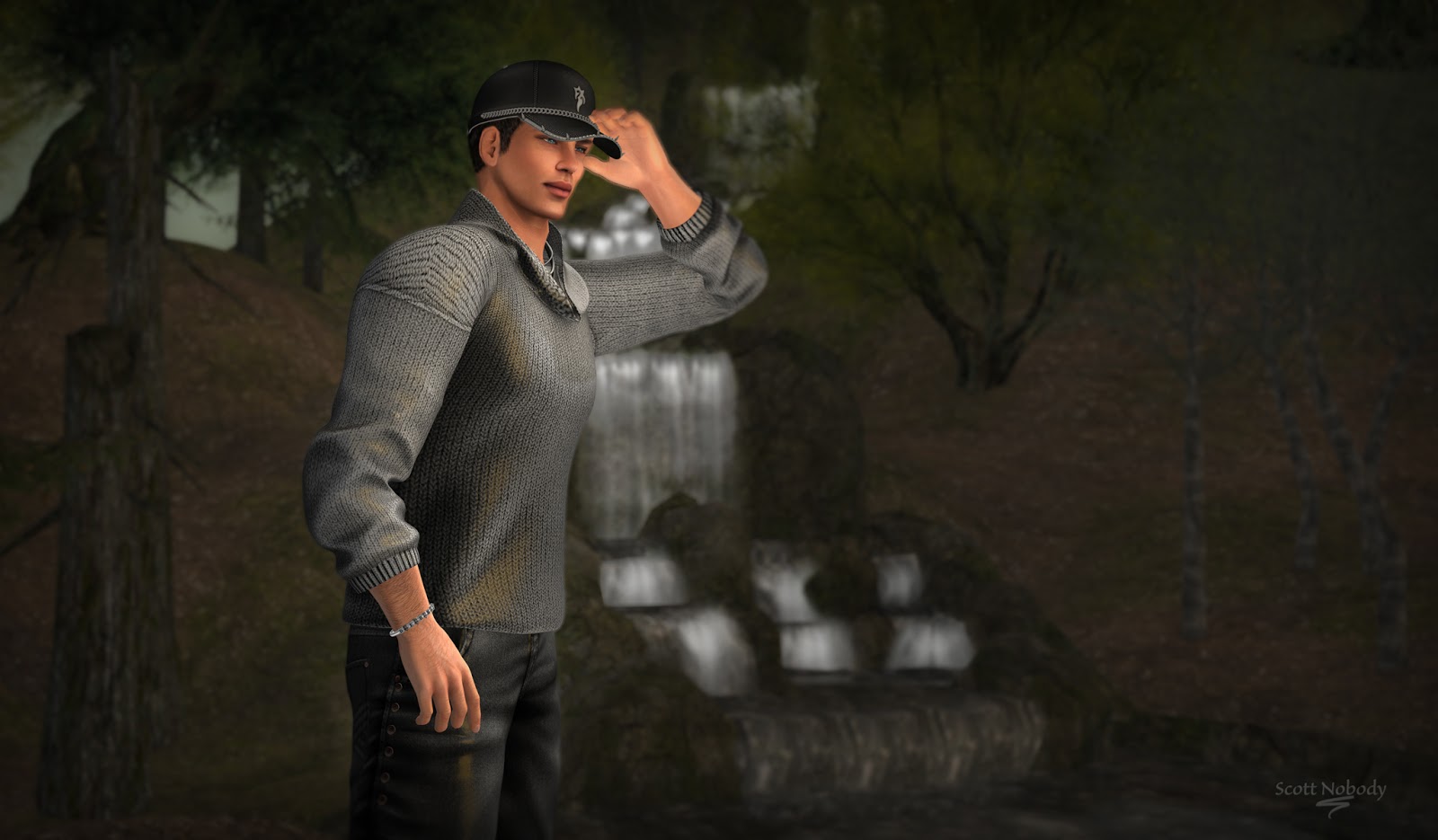
Starting at the top, the ball cap is HUD controlled with five different colors and two types of metal silver and gold. A really convenient re-sizer is also in the HUD. Great idea!


The sweater and pants is also HUD controlled, 11 colors for the sweater and 10 different colors for the pants and pockets.

 This weeks L$55 item from Glint Jewelry is this very nice Leather Skull bracelet. Looking up close it has really nice leather textures. A great find.


Style card:


Outfit:

Jewelry:


The blog post can also be found on http://debbiejasper16.blogspot.sg/


Tuesday, February 16, 2016

She's mine


Another really nice treasure from Glint Jewelry & Accessories is this customize-able block letter bracelet for both him and her. When you purchase this bracelet, all you have to do is to fill out the accompanying note-card and return it to Rainbow. She will very quickly personalize your bracelet and sent it back to you. I believe a total of 6 letters of your choice is maximum on each bracelet. The bracelet is easily adjustable via a script dialog box, and making sure it sits right on your wrist is of course done via the edit menu.

The outfit I'm sporting on this beautiful morning is from FashionNatic on the markedplace (link below). It's completely HUD controlled for pants, shirt and tie. 35 colors and textures for the shirt and the tie, 8 colors for the pants. There is an option for hiding the tie if you choose to do so.

Finally, a great pair of shoes from L&B, (link below). They are the WingTip Fatpack option, also complete HUD operated with several color combinations.

Click image for lager size


Style card:


Jewelry:


Outfit:

  • FashionNatic - Vidor - Shirt Mesh
  • FashionNatic - Vidor - Pants Mesh
    • FashionNatic is only on the Second Life Markedplace.

Shoes:

  • L&B - Dress shoe WingTip Fatpack


The blog post can also be found on http://debbiejasper16.blogspot.sg/


Monday, February 8, 2016

MensStuff Hunt - Glint Jewelry & Accessories

Being notoriously bad at hunts, I did somehow manage to find the MensStuff Hunt treasure at .:Glint:. Jewelry & Accesories the other day.

The gift contains 2 leather bracelets, one wide made of several leather knotted strings with diamond print beads, and one single string of leather with metal rings and metal beads. The single strand bracelet is easily scale-able via a HUD - just click on the bracelet, whereas the wider bracelet can be scaled via the edit menu. Both of them are a great additions to the casual guy.


Style card:


Jewelry:


Jeans:

  • Redgrave - Jeans HeavyUsed - Classic Cut Mesh

Shirt

  • Luke Tucked in White T-shirt.

Shoes:

  • Ryder Boots - Navarro Ankle


The blog post can also be found on http://debbiejasper16.blogspot.sg/


Saturday, January 2, 2016

Photography tips #2 - Watch your background.

This time we'll take a look at another simple way of making your Second Life photos turn out better. In photography, the background is or can be just as important as the subject. Especially when the background is interfering with the subject in a way that is unintentional.

Its a simple tip really. Lets call it the "Keep the head in a clean spot" tip. What I mean by that is, when you shoot your self or another person, try and keep the background behind the subjects head clean so nothing appears to be growing out of, sticking in to, or going through their head. A good example could be tree branches that mysteriously protrude from the subjects head, or a lamppost sticking out of the top of the head.
Here the trunk of the tree is growing out of my head.
It is fairly easy to avoid this situation. A simple change of camera angle, or perhaps make the subject take a few steps to one or the other side will save a lot of work later in Photoshop.

Even though the back ground is messy, it is uniform behind the head, and the background is also been blurred by using the DoF feature in Firestorms Phototools
If it is impossible to keep a separation between the subject and the background, turning on the depth of field option in SL will help making the final image more pleasing to the eye.The trick here is that the eye will seek out sharp details before blurry details, and because of that we have a seperation between the back ground and the subject.. Still, moving the camera slightly will eliminate the unfortunate tree growing out of the head completely.

Even with DoF enabled, the tree trunk is still where is shouldn't be, however a better version that with the DoF disabled.


Again, tree in a position where  they shouldn't be any.

A slight move with the camera and the head it is clear, however we have another problem  - horizon lines going through the head.
 Another scenario to keep an eye out for is horizon lines going through the head of a subject, as in the line between the sky and the ocean for example. A slight move with the camera and the problem is gone.


Horizon lines through the head are almost as bed as trees and lamp posts.
Camera is re-positioned for a better end result.

This post was also posted on http://debbiejasper16.blogspot.sg/


Saturday, December 26, 2015

Photography tips #1 - Rule of thirds

Second Life photography is so much fun, and lots of people do it. Here is a way of taking real life photography tips and bringing it into Second Life.

One of the most simple ways of improving your images is to use the "rule of thirds". When you shoot a picture in SL, typically the object ends up dead center of the shot if you don't move your camera. That is not necessarily the best spot for an interesting image. Watch any movie, magazine, billboard, even the news on TV. Pretty much everywhere, this rule is applied in some form or another.

The rule of third grid looks like this:


When you're framing your shot, imagine four lines that is about 1/3 of the entire length or height in from either edge. Where those lines intersect, you have a focal point (red circle). A point where the eye almost automatically goes to right away when we look at an image. You can use this to your advantage and position your object, in one of those intersections. It can be in anyone of the four intersections, just pick one that looks good to you.
Fun fact: Most people will look at the top left intersection first, then the bottom left, then the top right and so on. You will quickly find out using this method, your images will look more pleasing to the eye.


The lines are also very helpful. In landscape shots for example, you want to the horizon line to run along one of the two horizontal lines in the grid - a third from either the top or the bottom.
The vertical lines can be used to line up a tall structure or a person in just the right spot.


Not the optimal position of the subject, even though the horizon is located along the right line.
If you know you are going to be editing the image in Photoshop or Gimp later, try to make sure to leave extra room for a crop if that's is your intentions. With the crop tool in Photoshop or Gimp you can easy put the object in the desired spot, however, having not done that at the time of shooting, you will now have eliminated a lot of good pixels. Something to think about :)

Last but not least,  - this is a more a guide than a rule. - Rules are there to be broken, and very often you will get an interesting result by doing just that. An example on that could be a shot where the back ground is 100% symmetric or perhaps there is a perfect reflection. But more often than not, using this guide, or rule, will give you a better image, and should result in more favs on Flickr.


Bonus tip: Both Gimp and Photoshop has the rule of third as a guide preset already built in. Here's how you turn them on when you're using the crop tool.

Photoshop:

Select the crop tool, (C) - in the tool bar, click the mesh looking icon, and select the Rule of Third grid. Now drag from corner to corner to select the entire image. As soon as you let go of your mouse the grid will pop up and you can now adjust the handles on each side of the cropping window to place the image the way you like it.


Gimp:

Click the pen cutter like tool....?! (Shift+C) to select the crop tool. In the drop down list, chose Rule of Thirds guides. Now drag over the entire image and your grid will be drawn out. Now you can adjust the crop by using the handles in each corner to get the composition right.


Thursday, December 24, 2015

Being casual

Ahh...the casual look. A pair of jeans, a t-shirt, some shoes or boots and perhaps a jacket. It's a look that a lot of guys in Second Life use. Im my opinion the casual look just got even better. I was at TMD - The Mens Department awhile back, where Cold Ash had a small display of one or perhaps two of their outfits. A quick visit to their main store, and I was sold on the out fit below. All 3 items are of course mesh and were purchased separately.


The jacket is the Ryder. It can be used with or without the T-shirt, and in the including HUD you will find 6 great leather textures in different colors for the jacket, and 6 muted colors for the T-shirt making it easy to find a good look.

(Click any picture for a larger view.)


The jeans are called Ocelot, a nice straight fit, very worn looking pair (but not ripped),. The HUD gives the choice of 6 tones from light blue to black
Last but not least to complete the look, I chose the Jericho desert boots. It's a short boot, and goes perfect with the jeans and other long pants. Again there is an option for picking a color to go with the rest of the outfit, this time 5 different tones ranging from Copper (light brownish) to Black.


Style card:


Outfit:


Picture location - Tempelhof


Saturday, December 19, 2015

At this time of year...

...most places in the northern hemisphere will at some point see the white stuff. Of course most sim designers in SL follows the seasons. One of those must see sim's is Calas Galadhorn "White Christmas" -a spectacular looking sim.  With a visit there to see the sights with a very good friend, I quickly realized I looked somewhat under-dressed. And we cant have our precious pixels catching a case of nippleitis - right?

I went looking for a nice dressy looking jacket, and found this Oasis Jacket in the G I O M E N inworld store. It looks great, perfect for a walk in the snow with a special friend. You can also find G I O M E N on the MP.

It features rich hi-res textures on the jacket and shirt. 10 Exchangeable textures for the jacket and 12 textures for the shirt, which all can be changed via the Oasis Jacket HUD giving several very nice looking combinations. It comes with one alpha for 5 mesh sizes from XS to XL. A Fitted mesh size and of course the texture exchange hud is also included.


Style card:


Outfit: 


Picture location - Winter Moon